One of the biggest questions asked by quilt lovers is: "Who made it, when did they make it and what pattern did they use?". Well now there is a program for quilters and textile artists to document their creations along with the important details about the quilt called
Quilt Album. Another bonus, it can be used on Windows or the Mac operating system.
Not only can you document your own quilts, but you can also add photos from quilts that you have seen at shows or in magazines, to use as reference or inspiration. How many times have you seen a quilt you like and then forgotten where you had found it or who designed the pattern. Now you will always have that information, at the click of a button.
Quilt Album not only documents your quilt, but you can also print out the pages to make your own album, that you can share with others. There are also features that allow you to make cards, labels, business cards and address labels.
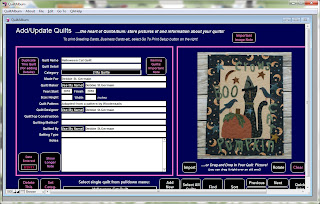
Quilt Album comes in two ways, as a cd or you can choose an instant download. I used the instant download and I was amazed at how fast the download was and easy to install. It is so easy, that I never had to read the manual. I was able to add quilts and information just by filling in the required information.
The window is self explanatory, all of the features are viewable in one window. You can load photos from your picture folder and fill in the information. I do not have all the information on some of my quilts, so I just added what I could remember. It also stores your personal information so that you do not have to fill your name in, each time.
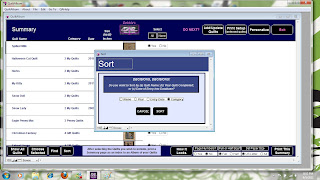
When you have filled in the details about your quilts, you can open up the quilt summary page to see all of your quilts at a glance. This page can be printed out and used as an index for your album. You can sort your quilts and in my case, I used categories. This way I could have my quilts and other textile pieces in their own categories, for easier searching.
I used photos that I had available but it is good to make sure you use quality photos. Taking a photo of your quilt on a wall is best, especially if you want to make them into cards or labels. On the other hand, placing the quilt in a setting, works beautifully for holiday cards.
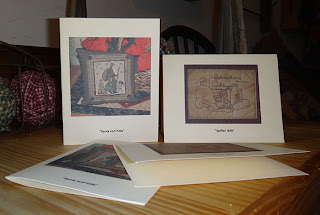
I really like the card feature, especially since I never have a note card when I need one. Now I can just make my own and have them ready to send with gifts. When making a card, you choose from your selection of quilts and choose what information you want to show, on the back of the card. You can also change the fonts to make them larger, or use a fun font, like I did with the kitty card.
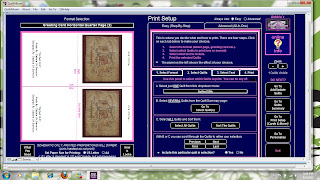
I printed out two sets, one for a Christmas card and one for a general card. I used my designs on these two examples with an idea in mind. I think it would be fun to send cards from my designs and insert the pattern inside the card. And since you can use the program for any type of craft, it is something any textile artist could use. And for those of us who sell our pieces, it is an excellent way to keep track of what you made, and who bought it.
I used basic card stock, but you can use any card stock that works with your printer. Imagine the possibilities with specialty card stocks that are available now. Once the information is filled out and a quilt selected, it is only a matter of hitting the print button, no special settings were needed.
This program is so easy, it is ridiculous, I keep thinking I am missing something. But it really is that easy and if you need help, you can download the PDF manual which is nicely formatted and easy to follow. It also includes hints and tips for photographing your quilts and printing.
If you would like to learn more about
Quilt Album you can visit their website, view a video and sign up for their newsletter. You can also visit them on
Facebook where they have random giveaways for their followers. A special Thank you to
Pat Sloan for giving me the chance to review Quilt Album.
The generous folks at
Quilt Album will give one lucky visitor a free copy of Quilt Album. Here is your chance to have your own copy of Quilt Album and document your quilts. Just leave a comment about what features you like about the program and/or how you would use it for your art work. Leave a comment on this post only and on Saturday, Spetember 10th, I will draw a name from the comments.